Work with your agent
The main way to work with Thermite SCADA is through your own AI agent. You describe the equipment and what the operator needs. The agent does the file work, puts up a draft, and shows you what it did. Everything it touches is a plain file you can open, and the rest of these docs describe each one.
Give your agent this prompt.
Unpack Thermite SCADA and start the gateway as the package's README describes. Open your agent in that folder and give it this prompt, with your own description in the middle.
Read AI-GUIDE.md in this folder, then the pages in docs/ that it points to. The Thermite SCADA gateway is already running on this machine.

Here is what I want to build:
<describe the equipment, how it connects, and what an operator needs to see>

Create a new project for it. Add the device, write the tags, and build the screen. Put your work up as a draft and check the live values through the gateway before you show it to me. Tell me the draft address, what you changed, and how you verified it. Do not publish to production until I say so.
Say how the equipment connects: the protocol, the address, and what each register or tag means. The more exact you are, the less the agent has to ask.
What came back when we tried it.
We gave that prompt, word for word, to a general-purpose coding agent that had never seen the project. The furnace controller was a simulator on the same machine. This was the description in the middle:
Holding furnace HF-2 has a Modbus TCP controller at 127.0.0.1 port 5022, unit 1. Holding register 10 is the bath temperature in °F multiplied by ten. Holding register 11 is the bath level in percent multiplied by ten. The operator needs one screen that shows both values with their units and shows clearly when the data is not good.
A few minutes later it reported back, and this was at the draft address:
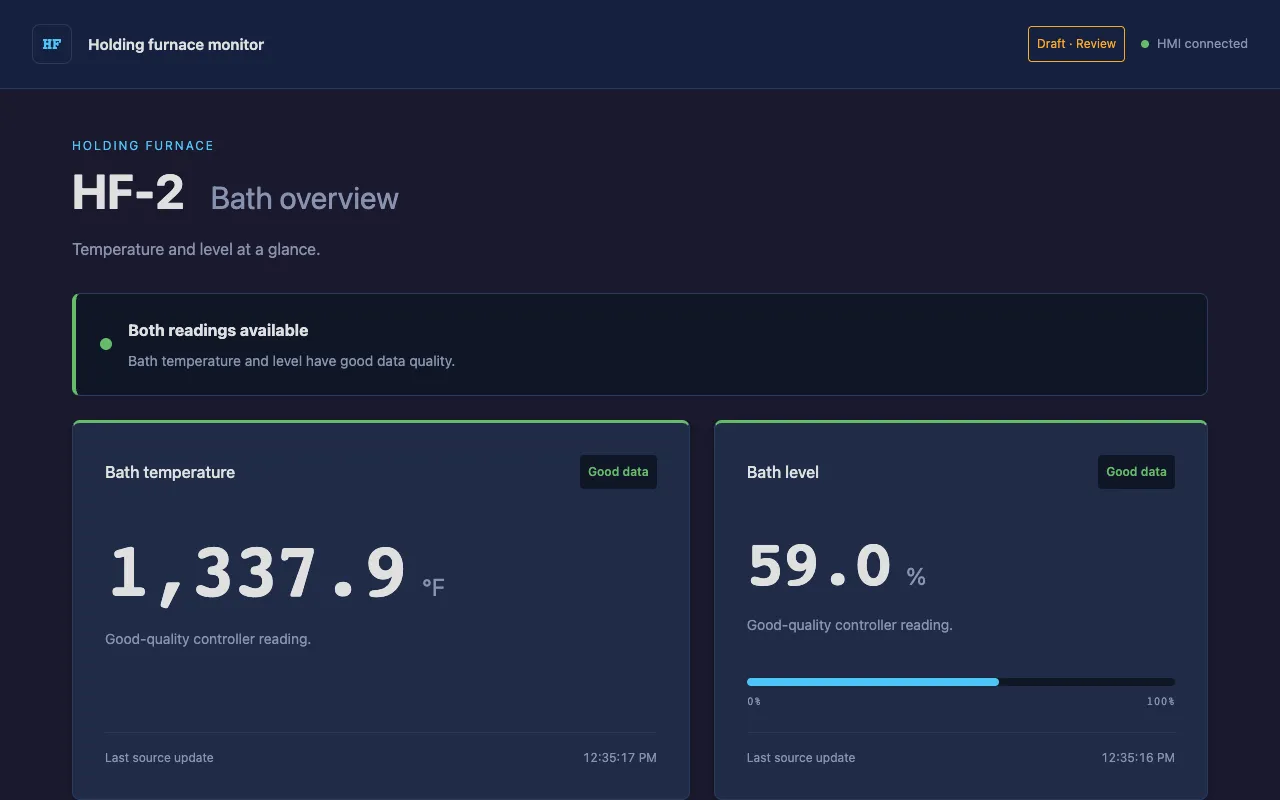
Its report, as it wrote it:
Draft ready: Open the HF-2 screen.
- Added hf2-plc at 127.0.0.1:5022, unit 1.
- Created project hf2 with HR10:u16 and HR11:u16 tags.
- Built one screen showing °F and %, scaled by ten, with clear quality labels. Non-good readings are hidden.
Verified live REST and WebSocket readings: 1,336.6 °F and 61.6%, both good. […] TOML/JavaScript validation and 25 simulated failure-state checks passed.
Existing projects and devices are unchanged. Nothing was published to production; HF-2 production routes return 404.
What your agent does with it.
- Reads the guide
AI-GUIDE.md first, then the reference pages in docs/ that it points to.
- Creates the project
thermite project init <slug> makes the project folder and its manifest.
- Adds the device
A [[devices]] entry in site/config/server.toml. The gateway loads it without a restart.
- Writes the tags
TOML files in the project's tags/ folder: one entry for each value, with its device address, units, history, and alarms.
- Builds the screen
HTML, CSS, and JavaScript in the project's screens/ folder, bound to the tags.
- Puts up a draft
thermite project draft <slug> <name> serves the work at /draft/<slug>/<name>/. Production is untouched.
- Checks its own work
It reads the live values back through the gateway's HTTP interface and looks at the screen before it shows you anything.
- Reports
The draft address, the files it changed, and how it checked them. Then it waits for you.
Look at the draft, then decide.
Open the draft address in a browser. It shows live values from your equipment, and drafts never raise alarms. Read what changed: the project is plain text, so git diff shows every line. Ask for changes in plain words and the agent updates the same draft.
When it is right, tell the agent to publish, or run the command yourself:
thermite project publish <slug>
Nothing reaches production until someone publishes. The previous production snapshot is kept.
Look through the files yourself.
You never need the agent to see or change anything. These are the files it works in, and the page that describes each.
| File | Holds | Described in |
|---|---|---|
| site/config/server.toml | Gateway settings and device connections | Server configuration |
| site/projects/<slug>/project.toml | The project's name, home screen, and which devices it may use | Projects |
| site/projects/<slug>/tags/*.toml | Tags, history settings, and alarms | Tags |
| site/projects/<slug>/screens/<name>/ | index.html, screen.js, and style.css for one operator screen | HMI screens |
| site/published/ | The snapshots the gateway serves: drafts and production | Publishing & the CLI |
The Quickstart does the same work by hand, one file at a time.
The docs your agent reads are on disk.
The download includes AI-GUIDE.md, written for agents, and a docs/ folder with the product reference. Your agent has what it needs without going to the web. Those files are the documentation for the version you downloaded, so the agent never reads about a different version from the one it is working on.
On the web, every page of these docs is also plain Markdown. Add .md to a page's address, or start from /llms.txt, which lists them all.
Bring your own agent to a live demo.
We'll run a gateway, you bring the agent you already use, and we build something from your plant together. Schedule a demo →